SHAREPOINT 2016 & 2019 ARE NOW UNSUPPORTED
Your SharePoint estate, finally under control.
Hands-on Microsoft 365 consulting for organizations of 50 to 2,000 users in Canada and the US. You pay a fixed fee or buy a bank of hours. Either way, you know the price before I start.

FIXED FEE
5 days
Migration Readiness Assessment
FIVE YEARS HANDS-ON
IN SHAREPOINT
-
5 yrs
Hands-on with SharePoint 2013 / 2016 / SPO
-
2,000
Users on the SharePoint migration I run at my day job, mid-cutover
-
50–2,000
User range I take engagements in
-
10+
InfoPath to Power Apps rebuilds shipped at my day job
The difference
A one-person practice, on purpose.
Big firms sell you a senior and staff you a junior. Freelancers take whatever walks in. You email me, I answer. I write the plan, the scripts and the report myself.
- The person who scopes the work is the person doing the work.
- Fixed-fee or hour-bank. If my estimate is wrong, that is my problem.
- Unused hours roll over and never expire.
The migration journey
Five stages. You always know which one you’re in.
The checklists and posts on this site are organized by these stages. Each stage has an end point, discovery included.
-
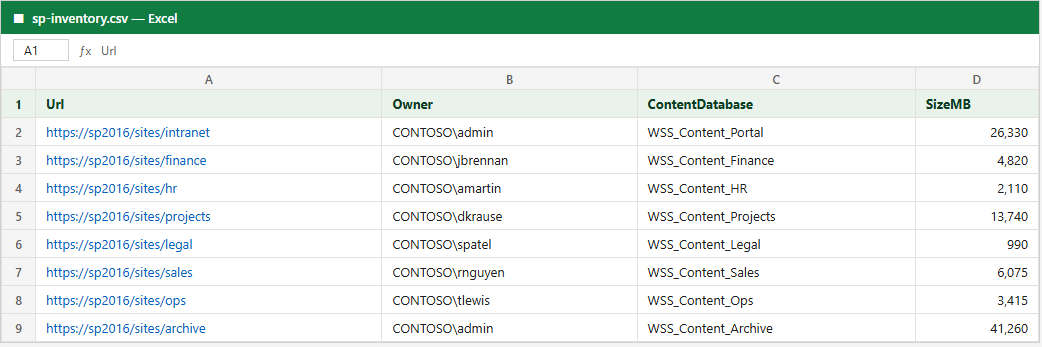
Site, list and library inventory across every web application, plus the customizations nobody documented.
-
What migrates clean, what needs a rebuild, and which wave each site belongs in. Ends with a number you can budget.
-
Locked source, final delta, waves overnight, and a go/no-go rollback call at the six-hour mark.
-
Day 1, day 7, day 30. Permissions, versions, workflows, search index, and the links nobody clicked yet.
-
Retention labels, external sharing posture, access reviews, and the runbook that keeps them true a year later.
Engagements
Three ways to work together.
-
FIXED FEE
Migration Readiness Assessment
Five working days. You end with an inventory, complexity map, phased plan, risk register and cost estimate, before you commit to a full migration.
WHAT LANDS IN YOUR INBOX
- Estate inventory (XLSX)
- Complexity map (PDF)
- Phased migration plan
- Risk register + cost estimate
Five-day engagement Read more about Migration Readiness Assessment
-
BY THE HOUR
Hourly Consulting
Buy 5, 10 or 25 hours and use them when you need them. Unused hours roll over and never expire. Good for second opinions, focused fixes and quick questions.
WHAT LANDS IN YOUR INBOX
- A written answer after every call
- Scripts and runbooks you keep
- Hour ledger you can see any time
- Rollover, always
Hour bank Read more about Hourly Consulting
-
FIXED-FEE PROJECT
Migrations & Power Platform
Full SharePoint migrations, Power Apps builds, governance programs and Copilot readiness. Milestone invoicing, 50% up front.
WHAT LANDS IN YOUR INBOX
- Signed SOW with locked scope
- Cutover runbook, hour by hour
- Post-migration validation passes
- Handover documentation
Milestone-based Read more about Migrations & Power Platform
Field notes
The writing behind the checklists.
- Govern
SharePoint as a virtual data room: what it covers, what it doesn't
A buyer, auditor or lender wants your confidential files in a data room. The Microsoft 365 tenant you already pay for covers most of it: named access, view-only links and an audit trail. It can't tell you how long someone read page 14, and that's where a paid data room still earns its fee.
- Govern
Locked out as your only Microsoft 365 admin: how to get back in
Your phone is gone, your MFA codes stopped working, and you're the only admin. There are three ways back in: password reset, a second admin, or Microsoft support. Only one of them works if you never set anything up, and it's the slowest.
- Govern
Your flow failed on Tuesday and nobody knew: set up alerts
Power Automate only emails you about failures it knows how to fix, and then goes quiet for 28 days. Wrap the steps that matter in a Try and Catch scope that emails you a link to the failed run. Check the admin alerts too, but they need a managed environment and run once a day.
TWENTY MINUTES
Tell me what is stuck. I will tell you what it takes.
Same consultant from the first email to the last cutover.